
Skip to content
  • Features
  • How it Works
  • Pricing
  • FAQs
  • Documentation
0 - $0.00
  • 0 items
  • view cart

No products in the cart.

Buy Now

Getting Started

  • Install and Activate eRoom Free & eRoom Pro
  • System Requirements
  • Configuring the plugin
  • License Activation
  • License Upgrading
  • Meeting Reports
  • Meetings Grid
  • How to Add Meetings to Page
  • How to Add Meetings
  • How to Add New Users

Zoom Integration

  • How to Obtain APIs
  • Webinars
  • Migration Wizard

Google Meet Integration

  • Google Meet Addon

Microsoft Teams Integration

  • Microsoft Team Integration

Purchasable Meeting

  • Purchasable Meetings Addon

Recurring Meeting

  • Recurring Meetings Addon

Hooks

  • Filter: eroom_date_timezone_display
View Categories
  • Documentation
  • Zoom Integration
  • Migration Wizard

Migration Wizard

Previously JWT credentials was used to connect and utilize eRoom plugin with Zoom API. JWT app type will be deprecated from June of 2023. Please see JWT App Type Depreciation FAQ for more details.

Until the deadline all your current APIs will work but it is recommended to run the migration wizard to smooth the transition to the new Server to Server OAuth system.

Step 1. Get Server to Server OAuth Credentials #

Initially, it is required to generate Server-to-Server OAuth credentials following manual below:

How to Obtain APIs

Step 2. Migration wizard #

To run Migration wizard open Zoom settings from the dashboard.
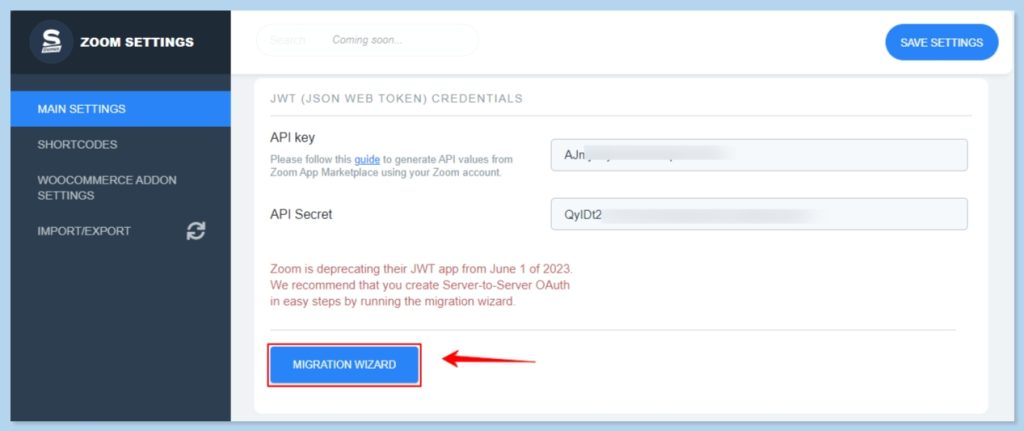
In open Popup window add Account ID, Client ID and Client Secret to the corresponding inputs:
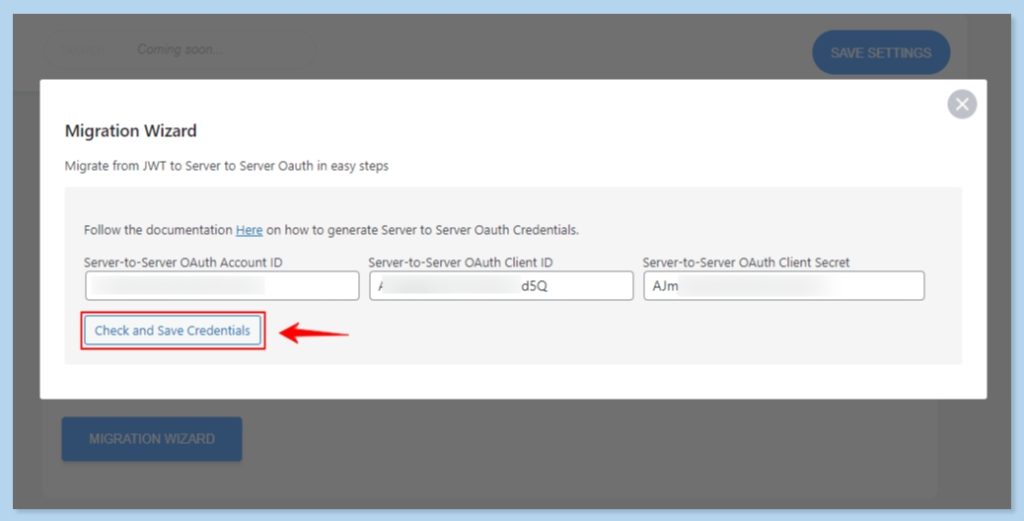
That is all, Server to Server OAuth API is ready to use.

What are your Feelings

  • Happy
  • Normal
  • Sad

Share This Article :

  • Facebook
  • X
  • LinkedIn
  • Pinterest
WebinarsHow to Obtain APIs
Table of Contents
  • Step 1. Get Server to Server OAuth Credentials
  • Step 2. Migration wizard

Ready to get started?

Join 40,000+ WordPress admins. One-time setup, lifetime value.

Get Started — $49.99
View Demo

14-day money-back guarantee · Secure checkout via Stripe

© 2026 TRS Plugins · All rights reserved